API Quickstart: Photobooth Uploads
Last updated: August 5, 2026
With an API key, external systems like photo booths upload straight into your event. The key is created in the app; the full reference lives in the API documentation.
1. Generate your API key
In the admin area, open the API section (API Key Management). Generate a key, reveal or copy it with the buttons next to the masked value; regenerating invalidates the old key.
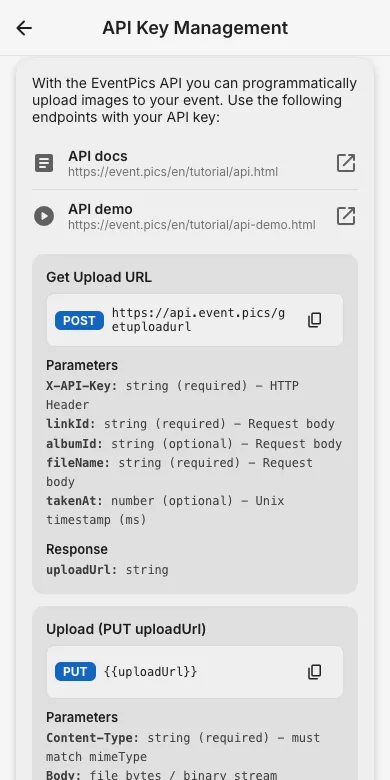
2. Upload via HTTP
Send a photo with one request:curl -X POST https://api.event.pics/v1/upload -H "Authorization: Bearer YOUR_API_KEY" -F "[email protected]"
The exact endpoints, parameters and limits are documented in the API guide (OpenAPI spec included).
3. Typical setups
Photo booth software with a webhook or folder watcher, a Raspberry Pi camera at the entrance, or batch scripts after the event: everything that speaks HTTP can fill your gallery.
Try it yourself
EventPics is free to start: 2 GB storage, unlimited guests, upload in the browser or the app.
Open EventPics