Generate a Video From Your Photos
Last updated: August 5, 2026
The video generator turns your favorite photos into a short, shareable clip: perfect as a recap for WhatsApp, Reels or the thank-you message.
1. Open the generator
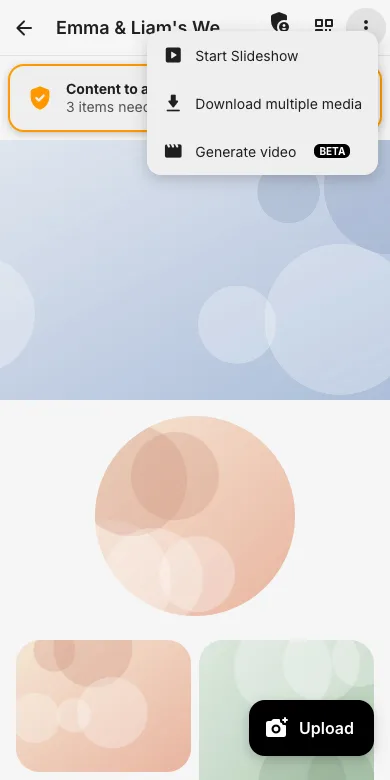
On the event page, open the three-dot menu and tap Generate video. Everyone with view permission can use it with the photos they are allowed to see.
2. Template, format, photos
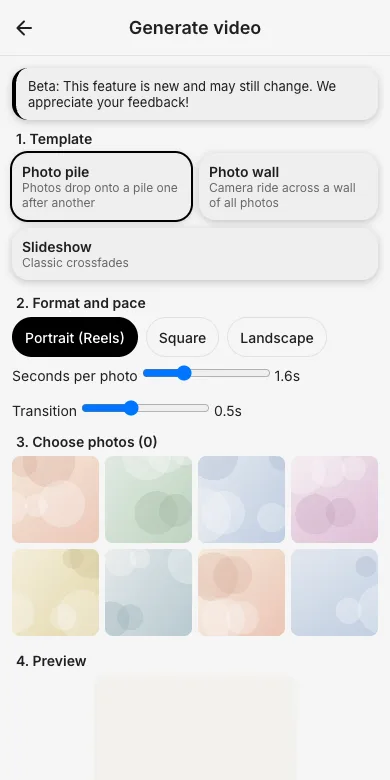
Choose a template (Photo pile, Photo wall camera ride, or classic Slideshow), pick the format (portrait for Reels, square or landscape) and select the photos.
3. Render and share
Start the render: the video is created on our servers, appears on the same page when done, and can be downloaded or shared straight from there.
Try it yourself
EventPics is free to start: 2 GB storage, unlimited guests, upload in the browser or the app.
Open EventPics